Product
Product information
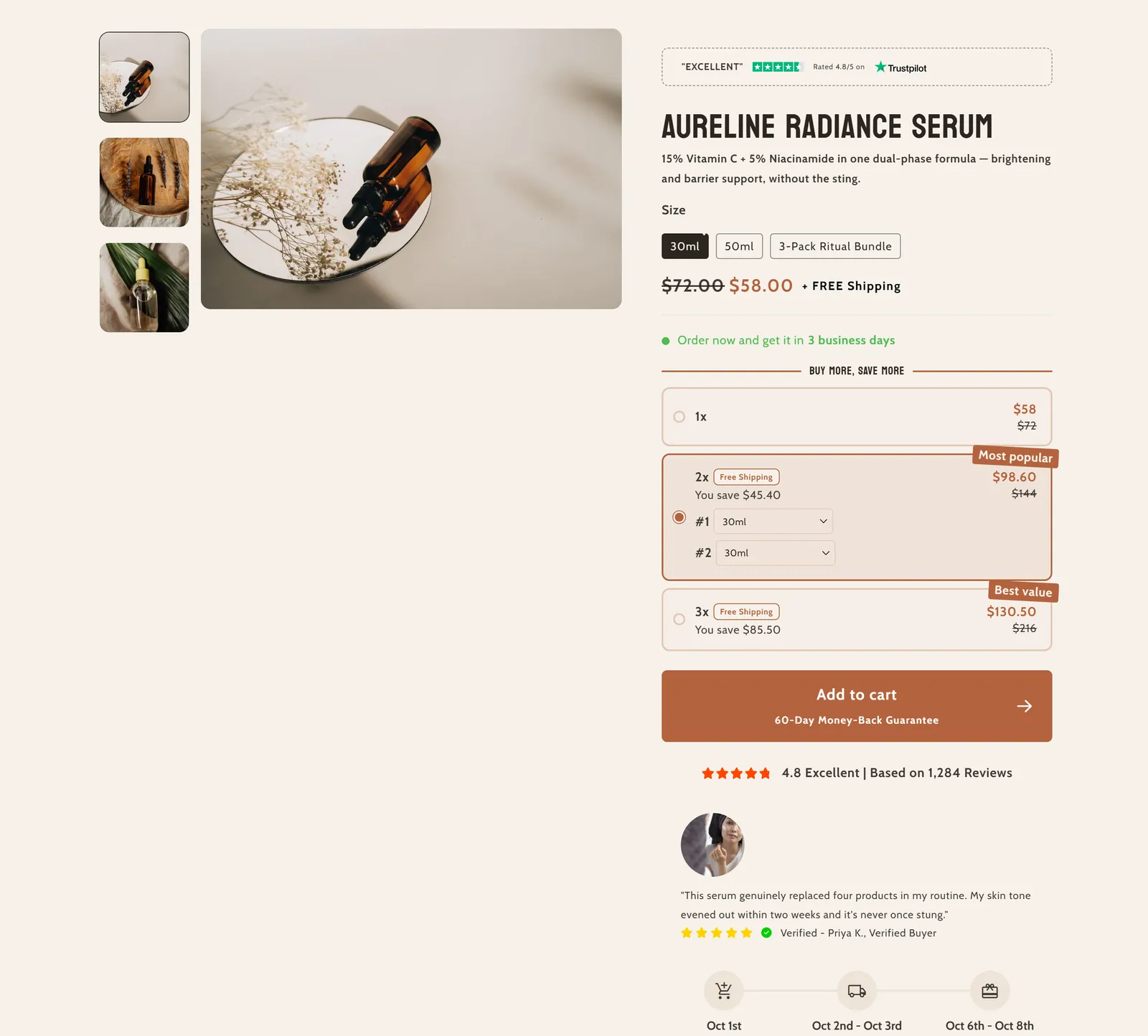
What it is
This is the main section of the product page: it shows the media gallery next to the buying information (price, variants, buy buttons and more). It is built from blocks you can reorder.
When to use it
- Build each product page with gallery, price, variants and buy button.
- Add trust with a trust badge, a review under the images or a text badge on the gallery.
- Ask customers for extra details (for example, a custom text) with custom fields.
- Add sales-support blocks such as a discount, gifts on quantity, a delivery date or add-ons.
- Used by default in
- Product page
- Available in
- Any template
- Limits
- Accepts app blocks
Main settings
How this section's settings are organised.
General4 settings
Show Border Line For Variants (Pills) · Enable sticky content on desktop · Gallery color scheme · Info color scheme
Media11 settings
Display first variant image as featured image · Desktop media width · Constrain media to screen height · Media fit · and 7 more
Mobile media8 settings
Mobile layout · Corner radius · Enable spacing between slides · Enable preview of the next slide. · and 4 more
Trust badge3 settings
Trust badge · Trust badge position · Trust badge size
Review under product images12 settings
Enable review · Review Background Color · Review Border Color · Star Color · and 8 more
Text badge within the image gallery15 settings
Enable text · Background Color · Opacity level · Text color · and 11 more
Mobile padding2 settings
Top padding · Bottom padding
Desktop padding2 settings
Top padding · Bottom padding
Custom Field 11 settings
Enable Custom Field 1
Text3 settings
Field type · Text Field name · Text Field Placeholder
Optional Text3 settings
Optional Text Field name · Optional Text Field Placeholder · Enable Optional Field
Pills & Dropdown input1 settings
Options separated by comma
Custom Field 21 settings
Enable Custom Field 2
Text3 settings
Field type · Text Field name · Text Field Placeholder
Optional Text3 settings
Optional Text Field name · Optional Text Field Placeholder · Enable Optional Field
Pills & Dropdown input1 settings
Options separated by comma
Custom Field 31 settings
Enable Custom Field 3
Text3 settings
Field type · Text Field name · Text Field Placeholder
Optional Text4 settings
Optional Text Field name · Optional Text Field Placeholder · Enable Optional Field · Shadow Color
Pills & Dropdown input1 settings
Options separated by comma
Custom Field 41 settings
Enable Custom Field 4
Text3 settings
Field type · Text Field name · Text Field Placeholder
Optional Text4 settings
Optional Text Field name · Optional Text Field Placeholder · Enable Optional Field · Shadow Color
Pills & Dropdown input1 settings
Options separated by comma
Custom Field 51 settings
Enable Custom Field 5
Text3 settings
Field type · Text Field name · Text Field Placeholder
Optional Text3 settings
Optional Text Field name · Optional Text Field Placeholder · Enable Optional Field
Pills & Dropdown input1 settings
Options separated by comma
Blocks
Content you add inside the section with “Add block”. Their settings are in the full reference.
- Divider11 settings
- Pixelion - Badges129 settings
- Pixelion: Review with img72 settings
- Video Carousel61 settings
- Title7 settings
- Pixelion Heading26 settings
- Pixelion - Rating stars50 settings
- Price13 settings
- Pixelion - Shop Pay1 settings
- Pixelion - Discount54 settings
- SKU4 settings
- Inventory status6 settings
- Pixelion - Qty selector79 settings
- Variant picker23 settings
- Variant List102 settings
- Sticky Add To Cart13 settings
- Pixelion - Note box43 settings
- Pixelion: Featured Review49 settings
- Pixelion - Blinking Dot18 settings
- Pixelion: Horizontal Tabs35 settings
- Pixelion - Social media9 settings
- Pixelion - Reviews14 settings
- Pixelion - description22 settings
- Pixelion Description V197 settings
- Pixelion: Happy Customers33 settings
- Custom liquid1 settings
- Pixelion - Pop-up5 settings
- Pixelion - Product rating2 settings
- Image9 settings
- Video18 settings
- Pixelion - Payment Option4 settings
- Pixelion - Gifts on qty34 settings
- Pixelion - Delivery Date28 settings
- Pixelion - Add-ons51 settings
- Pixelion - Fresh Upsells122 settings
- Pixelion - Collapsible57 settings
- Pixelion - Timeline31 settings
- Pixelion - Custom field20 settings
- Pixelion - Icons Plus89 settings
- Pixelion - Jump to33 settings
- Pixelion: Platform Review51 settings
Full reference: 1,675 settings
Type, default value, ranges and units, every option and when each setting shows — plus every block setting, tips and the docs of older versions. Available to Pixelion customers.
File: sections/main-product.liquid · v2.0.15