Free Chrome extension
Detect the apps on any Shopify store in one click
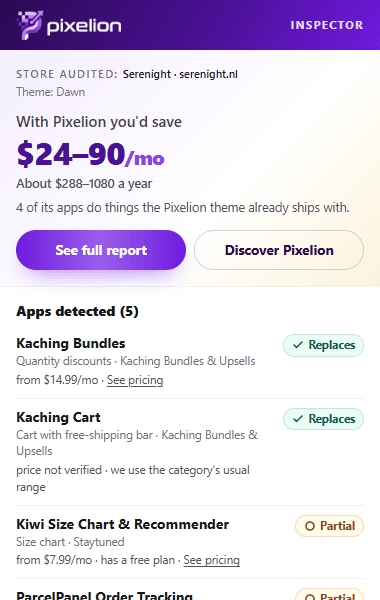
Open a store, click the Pixelion Inspector icon and see which apps it uses, which ones the Pixelion theme already does with no monthly fee, and how much you'd save.
Meanwhile, you can audit any store with the web detector.
How it works
- 1
Open a Shopify store
Yours or a competitor's: any store that's open to the public.
- 2
Click the Pixelion icon
The extension reads the public code of the page you have open, right in your browser.
- 3
See the apps and the savings
Each app with its label (Replaces, Partial or Stays · compatible), its price and what you'd save per month.
What it shows you
- Whether the site is a Shopify store (or has its storefront password on).
- The apps it loads: app blocks and embeds, theme extensions and scripts, including late-loading ones.
- Which apps the Pixelion theme replaces and which ones stay, working just like today.
- An estimate of the monthly savings based on Shopify App Store prices.
- A link to the full report on pixelion.es to share it or get it by email.
Private by design
The extension only reads the page when you click its icon and analyzes the code in your browser. It collects no personal data, has no analytics and sends nothing to any server: the only thing it downloads is our public app database, once a day.
Permissions it asks for
- activeTab
- : Read the tab you have open, only when you click the icon.
- scripting
- : Run the read-only scan of the page's public code in that tab.
- storage
- : Keep the downloaded app database in your browser so it isn't fetched every time.
Frequently asked questions
Is Pixelion Inspector free?
Yes. The extension is free, needs no account and has no paid features.
How is it different from the web detector?
Same app database, same calculation. The extension analyzes the page you already have open in your browser, so it also sees apps that load late or only on certain pages, and it works even when a store blocks bots.
Does it detect every installed app?
No. We only see apps that load something on the public storefront. Apps that work in the admin (inventory, invoices, shipping) or only at checkout leave no trace.
Does it work on Edge, Brave or Opera?
Yes, on any Chromium-based browser that installs extensions from the Chrome Web Store.
What data does it collect?
None. The analysis runs in your browser and the result never leaves it. If you open the full report, pixelion.es receives the store's domain in the URL, just like when you use the web detector.